|
|

Lexmark bounces back with affordable All-in-One aimed directly at digital camera users 

The P6250 All-in-One printer/scanner/copier is Lexmark's very first direct print solution that will work without being connected to a host computer. It will print directly from all the main digital camera memory card variants, including xD, without an adapter and you can print directly, using a USB cable, from cameras that support PictBridge and the majority of current cameras now do. A big and clear 2.5" LCD preview and status screen is standard and you get six-colour photo printing, 1200x2400 scanning and colour copying – all for a few pennies under £150.
But that's not all – I've reviewed quite a few Lexmark ink-jet printers over the last couple of years and I'm being diplomatic in saying that Lexmark has focussed rather more on bottom-line price and plain-paper printing features rather than photo-print features, speed and quality. That's all changed with the P6250 and the P915, the £99.99 printer-only sibling of the P6250 which will be available by the end of this month.
|
|
|
 |
 |

|
 |

If you don't need the scanner, save £50 with the new P915
Our feature check-list for All-in-Ones (below) reveals all. The P6250 has the specification of a serious photo printer that can hold its own in the study at home or in a small office.
Consumer All-in-One feature check-list:
| Max print resolution | 1200x4800dpi
| | Ink cartridge type | Print head integrated into disposable cartridge
| | Ink type | Pigment black, hybrid dye and pigment colour inks?
| | Single colour cartridges | Standard black only
| | Photo cartridge | Yes (photo black, cyan, magenta inks)
| | Borderless photo printing | Yes
| | Scanner resolution | 1200x2400ppi
| | Scanner type | Contact Image Sensor (CIS)
| | Automatic document feeder (ADF) | No
| | Film scanning support | No
| | High-speed USB 2.0 connection | Yes
| | Copier capability | Yes, colour
| | Fax capability | No
| | Stand alone direct printing | Yes, from memory cards and via PictBridge (front USB port)
| | Memory cards supported:
| | Compact Flash | Yes | SmartMedia | Yes
| | CF Type II and Microdrive | Yes | SD/MMC | Yes
| | Sony Memory Stick | Yes | Sony Memory Stick Pro | Yes
| | Memory Stick Duo | Adapter required | Extreme Digital (xD) | Yes
| | PC Card (PCMCIA) slot | No
| | LCD status panel | In colour preview screen
| | Colour preview screen | Yes 2.5"
| | Bluetooth wireless support | No
| | Network print option? | Yes
| | Wireless network print option? | Yes
|
On page 2 of this article you can tour the P6250 in pictures. But in the mean time, the crunch question is - does the P6250's impressive price and specification translate into a product that's good to use?
Good build quality and ease of use at last
Some recent Lexmark ink-jet solutions have been very lightly built and, frankly, unrefined. So I'm delighted to report that the P6250, resplendent in its new designer-look off-white and blue finish, is both solidly built, nicely designed and refined in operation.
Special praise goes to Lexmark's inclusion of a large colour LCD preview and status screen, which is put to good use providing handy animated help prompts, previewing, selecting and even editing photos and helping you choose the right print options. The copier section also has document reduction and enlargement functions.
Lexmark has also developed some excellent Mac and PC software that incorporates some powerful features, like automatic red-eye removal, delivered in a genuinely easy to use on-screen environment.
And what about photo print quality?
Lexmark has done the right thing and provided a 'true' five colour ink, plus photo black, ink set. According to Lexmark their new inks combine the wide colour gamut of dye-based inks and the longevity of pigment inks. We aim to investigate these claims more thoroughly in the final version of this review, but it sounds promising.
Once again the good news is that, so far, the photo print quality from our sample P6250 has impressed us. We took an image from an Olympus C-60Z and printed it directly from a memory card onto an A4 sheet of Lexmark's own premium quality glossy photo paper, using borderless printing mode.
The print had to be cropped a fair bit, but you can choose the area to be printed, both zooming and panning, using the printer's preview screen. Printing time was just over seven minutes from the moment the paper was moved into position by the printer. That's not fast - the fastest Canons can cover the same page in under two minutes and between four and six minutes is the norm for other printers, but the P6250's performance is a huge leap forward compared to other Lexmarks I've tested. Lexmark claims a 6x4 photo can be printed in under 40 seconds.
The scanned print samples reproduced below are from the P6250 and a much more expensive Epson Stylus Photo 2100, the latter printing on Epson Premium Semi-gloss paper. You can compare both against the original camera image at the top.

Olympus C-60Z camera original image

Lexmark P6250 direct print onto Lexmark premium glossy photo paper

Epson Stylus Photo 2100 print onto Epson premium semi-gloss photo paper
Without doubt, the P6250 has matched the colour of the original better. The Epson's colour has less yellow and more magenta than the Lexmark and its colours are less saturated. We're not suggesting the P6250 is a superior photo printer compared with the Epson 2100, but its colour is certainly more accurate using standard settings. Where the Epson scores over the Lexmark is in fine detail. The Epson also shows less grain, though it's by no means a problem with the Lexmark.
We've only had our sample P6250 a couple of days, but so far we're very impressed. A full lab-test of the P6250 will follow shortly. In the mean time, please proceed to page 2 for a pictorial tour of the P6250 and don't forget the detailed specifications on page 3.
Check the latest price or purchase this item via
|
|
|
|  |
| Click on the flag that best relates to your location |
| The EU flag links to Amazon Germany, currently the only European Amazon outlet that supplies electronic goods like cameras priced in Euros. |
| Each Amazon outlet can ship to most countries in the world. |
The P6250 in pictures
Here you can get closer to the new Lexmark P6250 with this selection of photos we've assembled, including some screen shots of the unit's colour preview and status display:
 It may be cheap, but the P6250 doesn't look it, or feel it. Care has clearly been paid to its aesthetics and function.
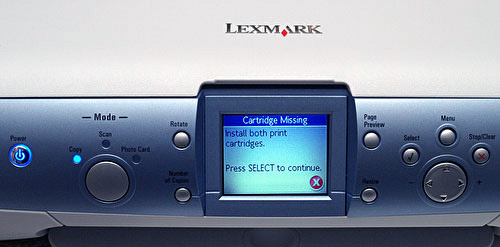 Dominating the front panel is the large 2.5 inch LCD display. It's clear and easy to read and the information it displays is generally easily understood.
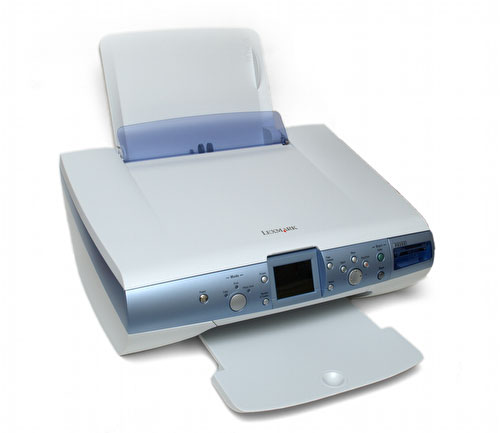 If necessary, a paper rest can be drawn out from under the unit. Up to a hundred sheets of plain paper can be accommodated by the fold-up paper feed.
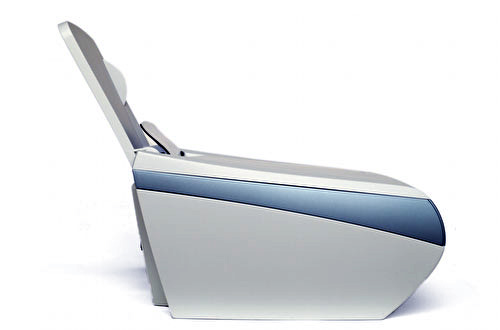 The P6250 even looks nice from the side. The near-vertical paper feeder enables the unit to be placed fairly close to a wall.
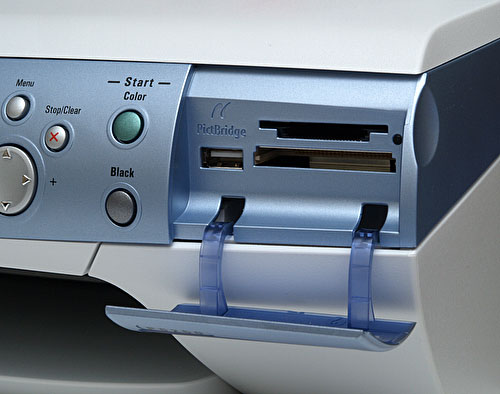 A universal card reader is provided and to its left is a front-USB port for connecting PictBridge compatible printers to.
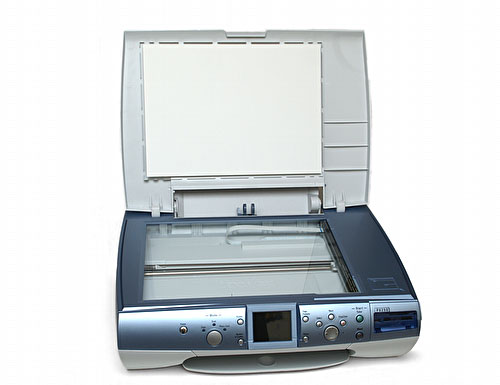 Lift the lid up and the scanner is revealed. The scanning element is a low-profile CIS type. Not visible in this shot, but Lexmark has included a thoughtfully illuminated corner to signal where to align your documents.
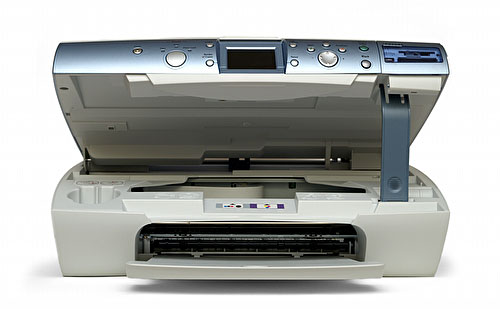 A fold-up rest keeps the scanner raised when access to the ink cartridges is required.
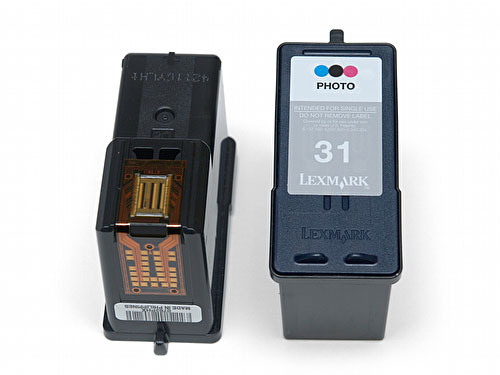 Lexmark's latest ink cartridges follow the company's long-standing policy of integrating the print head with the ink tank. You get a new print head each time you replace the cartridge, but this can make running costs higher than printers that only require replacement ink. We'll be testing ink consumption and running costs in the update of this review later.
 As you may have up to three ink cartridges for your P6250, that's standard black-only for plain paper printing, colour (cyan, magenta, yellow) and photo colour (photo cyan, photo magenta, photo black), Lexmark has kindly provided a storage unit for the third cartridge.
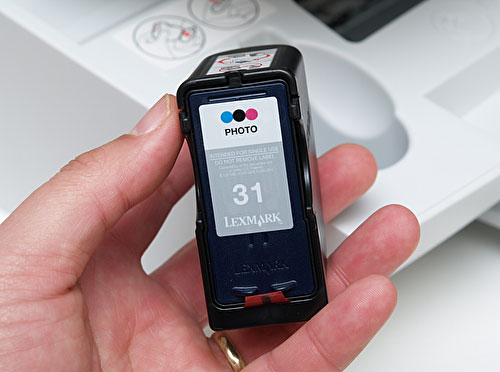 Pop the cartridge inside its holder to help prevent the head from drying out and…
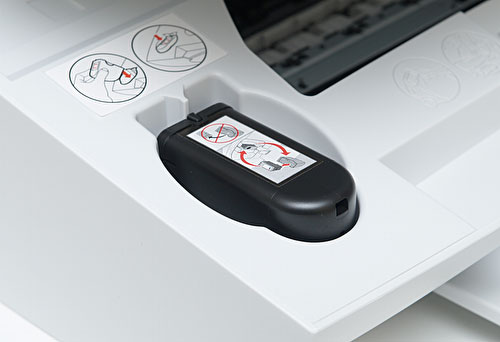 …then you can store it inside the unit, hidden from view when the scanner is put back into position.
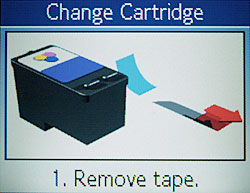
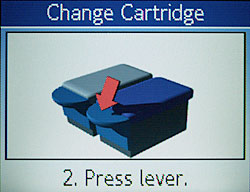
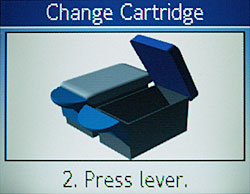
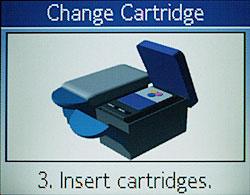
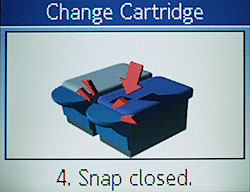
And, finally, here are some shots of the P6250's colour display: Here are some selected shots of the animated prompts that help you to replace an ink cartridge
…then you can store it inside the unit, hidden from view when the scanner is put back into position.
And, finally, here are some shots of the P6250's colour display: Here are some selected shots of the animated prompts that help you to replace an ink cartridge
 We'll have a lot more data from our sample P6250 soon when this article will be updated with a full set of print quality and performance test results, plus some extra pictures illustrating the hardware itself. We'll also reveal how much the P6250 costs to run.
Check the latest price or purchase this item via

|

|

|  |
| Click on the flag that best relates to your location |
| The EU flag links to Amazon Germany, currently the only European Amazon outlet that supplies electronic goods like cameras priced in Euros. |
| Each Amazon outlet can ship to most countries in the world. |
Detailed Specifications
| Print Technology | Thermal Inkjet
| | Colour Technology | 6 Colour Inkjet - Cyan, Magenta, Yellow, Light Black, Light Cyan, Light Magenta
Black Cartridge Optional for true black text
| | Scan Technology | CIS (Contact Image System)
| | Function | Colour Copying
Colour Printing
Colour Scanning
| | Maximum Print Speed (Draft, Colour) | Up to 15 ppm
| | Maximum Print Speed (Draft, Mono) | Up to 22 ppm
| | Maximum Print Speed (Normal, Black) | Up to 17 ppm
| | Maximum Print Speed (Normal, Color) | Up to 6 ppm
| | Maximum Copy Speed (Draft, Black) | Up to 18 cpm
| | Maximum Copy Speed (Draft, Color) | Up to 11 cpm
| | Print Resolution, Black
| Up to 2400 x 1200 dpi
| | Print Resolution, Colour
| Up to 4800 x 1200 dpi
| | Scan Resolution, Enhanced
| Up to 19200 x 19200 dpi
| | Scan Resolution, Optical
| 1200 x 2400 dpi
| | Operating Systems Supported
|
Apple Mac OS X (10.1.5)
Microsoft Windows 2000 (all versions)
Microsoft Windows 98 (All versions)
Microsoft Windows NT 4.0 (all versions)
Microsoft Windows XP (All versions)
Apple Mac OS X (10.2.3-10.2.8)
Apple Mac OS X (10.3.0-10.3.5)
| | Print (ASF) Paper Input Capacity (Maximum) 100 pages 20 lb or 75 gsm bond
| | Media Types Supported
|
Card Stock
Coated Paper
Envelopes
Labels
Plain Paper
Transparencies
Banner (A4 or Letter)
Hagaki Card
Index Card (3"x5")
Iron-On Transfers
Photo Paper
| | Media Sizes Supported
|
10 Envelope (4.125" x 9.5" or 105mm x 241mm)
7 3/4 Envelope (3.875" x 7.5" or 98.4mm x 190.5mm)
9 Envelope (3.875" x 8.9" or 98.4mm x 225.4 mm)
A4 (8.27" x 11.7" or 210mm x 297mm)
A5 (5.83" x 8.27" or 148mm x 210mm)
B5 Envelope (6.93" x 9.84" or 176mm x 250mm)
C5 Envelope (6.38" x 9.02" or 162mm x 229mm)
DL Envelope (4.33" x 8.66" or 110mm x 220mm)
6 3/4 Envelope (3.25" x 6.5")
A2 Baronial (111mm x 146mm)
A6 Card (105mm x 148mm)
B5 (182mm x 257mm)
C6 Envelope (114mm x 162mm)
Custom (Up to 8.5" x 17", 216mm x 432mm)
Hagaki Card (100mm x 148mm)
Index Card (3" x 5")
Executive (7.25" x 10.5" or 184mm x 267mm)
Legal (8.5" x 14" or 216mm x 355mm)
Letter (8.5" x 11" or 216mm x 279mm)
Statement (5.5" x 8.5" or 140mm x 216mm)
L (3.5" x 5", 89mm x 127mm)
2L (5" x 7" or 127mm x 178mm)
Chokei 3 (120mm x 235mm)
Chokei 4 (90mm x 205mm)
Chokei 40 (90mm x 225mm)
Kakugata 3 (216mm x 277mm)
Kakugata 4 (197mm x 267mm)
Kakugata 5 (190mm x 240mm)
Kakugata 6 (162mm x 229mm)
| | Standard Ports
|
USB 2.0 Specification Hi-Speed Certified
| | Optional Network Ports
|
Lexmark N4000e for Ethernet 10/100Base TX (Print Only)
Lexmark N4050e 802.11g Wireless Print Server (Print Only)
| | Reduce / Enlarge Range
|
25 - 400 %
| | Scan Area, Maximum (mm)
|
216 x 297 mm
| | Packaged Size (mm - H x W x D)
|
236 x 493 x 416.5 mm
| | Pallet Quantity
|
20
| | Pallet Size
|
37.8 x 48 x 40 "
| | Size (mm - H x W x D)
| 177 x 435 x 334 mm
| | Weight (kg)
| 4.8 kg
| | Noise Level, Operating
| 49 dBA
| | Copier Noise Level, Operating
| 39 dBA
| | Scanner Noise Level, Operating
| 36 dBA
| | Duty Cycle, Maximum
| 3,000 Pages per month
|
Check the latest price or purchase this item via
|
|
|
| |
| Click on the flag that best relates to your location |
| The EU flag links to Amazon Germany, currently the only European Amazon outlet that supplies electronic goods like cameras priced in Euros. |
| Each Amazon outlet can ship to most countries in the world. |
|
| |


