The use of and the technology of flash memory cards is evolving very fast. If you feel a little lost when it comes to the what's-what now with memory cards, especially for cameras and smartphones, this article aims to help.
This article concentrates on what's really current, so if you are even vaguely familiar with xD, Sony Memory Sticks and the like - we're not discussing these practically obsolete formats - and certainly not even older SmartMedia or even MMC formats. We aren't covering the relatively new phenomenon of SSD (Solid State Disk) drives, which are basically very large and very fast memory cards.
Quick links
What is a memory card?
In basic terms a memory card is a miniaturised device that uses non-volatile (it doesn't need constant power) flash memory to store digital data, like your photos, movies, music, etc. Most memory cards use NAND flash memory. The other main type of flash memory is NOR-type. NAND flash works more like a hard disk drive while NOR flash works more like system memory in your computer.
Do memory cards wear out?
Memory cards are solid state but the flash memory cell structure of NAND flash does have a limited operational life. So, yes, flash memory cards can eventually wear out. However, you should not lose any sleep over this; the life cycle of a flash memory cell is estimated to be between 100,000 and one million read/erase operations. It's unlikely that, in normal use, you would be able to hammer a memory cell any where near that many times and even so, memory cards shift data blocks around to reduce localised wear, a technique called wear-levelling. Memory cards can potentially wear out, but in practice they don't.
The most relevant memory card standards
There are only two memory card platforms that most of us really need to know about; SD (Secure Digital) and CF (Compact Flash). However, it's SD that now dominates the market in its various forms. CF remains important for photographers but even high-end cameras now have SD card slots and CF is starting to be phased out in professional high-performance cameras by a new standard called XQD, already supported by Nikon in its top of the range D4 pro DSLR. Meanwhile, SanDisk is rumoured to be working with Nikon rivals to develop an approved successor to Compact Flash, called CFast. But for most if us, SD cards will be the most commonly used memory cards.
SD Card variants
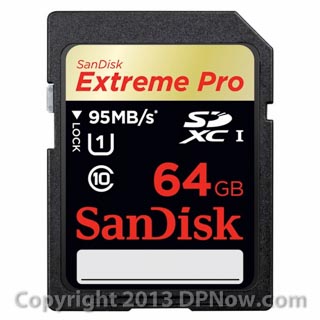
The bog-standard SD Card
The SD Card was launched in 1999 by its co-inventors, Toshiba, Panasonic, and SanDisk. It was based on a pre-existing card format, MMC (MultiMedia Card) with which it was semi-compatible. Those of us who were present at the launch were dubious of the intention to 'one day' produce a 2GB SD card. In 1999 your average memory card had 8 or 16 MEGA bytes (MB). Today, 16GB cards with over 2,000 times the capacity of an 8MB card from 1999 are now rapidly becoming the best-sellers, with 64GB and 128GB cards also freely-available.
The basic SD Card was designed with an address system that limited it to a maximum capacity of 2GB. Only a few initially realised that this would eventually become a serious limitation. Just 7 years after the SD Card was launched, a new SDHC (Secure Digital High Capacity) card format was introduced.
SDHC
SDHC cards increased the maximum capacity of the form factor a mind-boggling 16 times to 32GB. Few cameras and other devices that used SD Cards could be updated to be compatible with SDHC cards, although SDHC-compatible devices could also work with older up-to-2GB SD Cards. But as developments in the miniaturisation of flash memory cells continued and usage innovations like ever-increasing camera resolutions in both still and video, plus the advent of Full-HD video, it was increasingly clear that even 32GB would be surpassable in less time than many imagined. This meant the development of SDXC (SD eXtended Capacity).
SDXC
SDXC, announced in 2009 and shipping the following year has a maximum theoretical capacity of 2TB (terabytes or thousand gigabytes. Although there is a chance of technical compatibility with some devices that were designed take SDHC cards, it's probably wise to assume that unless SDXC compatibility is expressly described, that host device probably won't work with an SDXC card. At the time of writing the largest capacity SDXC card on the market is at 256GB, costing a cool $600 or so.
miniSD
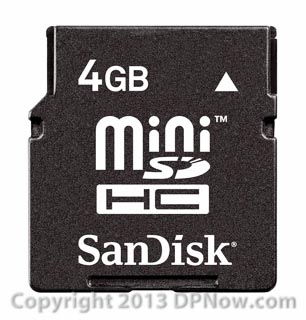
Although the basic SD card form factor is about the same size as a small postage stamp, the rise in ever more compact and pocketable devices like digital music players and mobile phones dictated the development of a smaller card size, just under half the size of a standard SD card. miniSD was the start, and based on the existing mini MMC card. Adapters to make miniSD and mini MMC cards fit standard sized slots are usually supplied with mini cards. But miniSD wasn't widely adopted by the time the even smaller microSD card arrived.
microSD
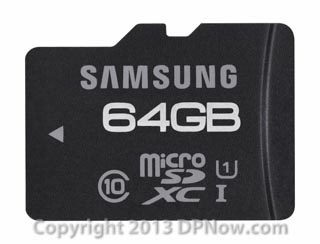
Smartphones made in the last 3-4 years that offer user-expandable memory storage are most likely to support microSD cards. Some conventional digital cameras, notably from Samsung, use microSD cards by default. microSD cards are less than a quarter of the area of a standard SD card and also much thinner. They are very fiddly to use but are actually designed to remain in the host device most of the time. Nevertheless, standard size SD Card adapters are often supplied with microSD cards for compatibility when required. microSD is a physical form factor for SD, SDHC and SDXC card formats. At the time of writing the largest capacity microSD card you can by has a 64GB capacity, costing $50-60.
SD card performance
The performance of any memory card is affected by a number of factors. One or the other will be the limiting factor, or bottleneck, in the system Originally, the limitation was the speed of the flash memory used in the card. When flash memory got faster it became the turn of the memory controller circuitry to be the bottleneck. Some cameras and card readers can't run at the speed the connected card is capable of, too.
SD Card speed class ratings
Because the use of cards was changing and performance started to be critical, especially for video recording, the SD card industry introduced a numerical classification to help users match up the most suitable card for their devices. It looks simple on paper:
- Class 2 - 2MB/sec (Basic stills camera performance)
- Class 4 - 4MB/sec (Capability of recording standard definition (SD) video)
- Class 6 - 6MB/sec (Suitable for recording 720HD resolution video)
- Class 10 - 10MB/sec (Suitable for recording 1080 full HD resolution video)
However, there are some flaws to the above system. First of all the classification of speed in transfer rate is for the minimum speed that the card can safely and reliably support. Originally the classification stopped at 6 (6MB/sec) but later, when Class 10 was introduced, it transpired that some Class 6 cards could operate at Class 10 speeds or even faster. Today there are Class 10 cards that only just qualify as 10MB/sec capable and there are Class 10 cards that are much faster.
A much better guide is an actual speed rating claimed by the manufacturer, SanDisk Extreme Pro cards are available in 45MB/sec and 95MB/sec speeds, for example and each type has this speed rating visible on the card and in the product information published. Even so, the figure is usually only for the rate at which data can be read from the card. It's harder to write data to a card and the write speed is usually slower. With 95MB/sec SanDisk cards the write speed is only slightly slower at 90MB/sec, but the read speed of cards from other manufactures might be 90MB/sec while the write speed might be much slower - maybe as slow as 25MB/sec or less. Buyer beware!
Practical speed limitations
Even with quoted speed ratings from the manufacturer, you may never see the performance of a card peaking at these speeds. For example, if you use a card reader connected via a standard 'High Speed' USB 2.0' cable, although the theoretical top speed of the cable is 480 megabits/sec (60MB/sec) because of various factors the speed may be limited to a maximum of just half that. If you want to benefit from the faster speeds offered by fast cards you need a card reader designed to connect via a very fast interface, like USB 3.0. Even so, sustained rates of 90-95MB/sec by cards rated at these speeds is rarely achieved. You may find that 50-60MB/sec is a more realistic rate in real life.
UHS-1
Many SD Cards now available are emblazoned with 'UHS-1', which stands for Ultra High Speed level-1. UHS-1 cards have high-speed controllers that can enable very fast reads and writes, up to a theoretical 50MB/sec. A later iteration of UHS-1 also supports faster transfers of up to a little over 100MB/sec. But once again, be wary if UHS-1 cards that appear to have fast read rates but also slow write rates.
SD Card physical durability
SD cards are delicate. They are very light, so falling onto the ground, for example, is unlikely to do much damage, but being stepped on or twisted could be fatal. The bigger and more reputable manufacturers do design SD card casings to be as robust as possible but there are limits. Samsung even has a range of cards that are filled with epoxy resin and are water resistant. It's very important to protect the end of the card that has the electrical contact pads and to avoid dirt spoiling the connectivity.
Compact Flash, variants and alternatives
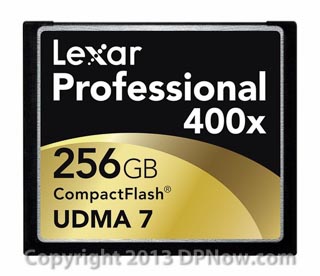
Basic CF
Until about 5 years ago practically all 'serious' cameras used CF cards. But then Nikon, Pentax and, later, almost everyone else replaced CF with SD card slots in their cheaper DSLRs and premium compact cameras. Even professional cameras started to feature SD card slots, but alongside CF. While Compact Flash remains important for the professional sector, its importance elsewhere has dwindled and the overall demand for CF has steadily fallen. This means that per GB, SD cards are more affordable. However, CF does have advantages; the cards themselves are much more robust and the physically larger size means they are less easy to lose and there is more space internally for chips, so CF cards have traditionally offered higher maximum capacities than SD cards. The fastest CF cards have also generally out-gunned the fastest SD cards in terms of read/write performance, although there isn't a lot to choose between the two in a practical sense at the moment. 133x (20MB/sec) were the fastest available until the advent of UDMA CF cards.
UDMA CF
UDMA stands for Ultra Direct Memory Access and is a storage interface standard developed originally for hard disks. If your camera supports UDMA then the use of fast UDMA cards can mean quicker buffer-clearing in the camera so longer bursts of high-speed sequential shooting can be achieved. The earliest UDMA cards were between 200 and 300x rated, where 1x = 150KB/sec. Therefore, 200x cards, in theory, could sustain a transfer rate of 30MB/sec, and 300x cards up to 45MB/sec. 600x (90MB/sec) and even 1000x cards (150MB/sec) are now available. Whether or not your camera can really make much use of the faster speeds is a moot point. The first step is to check the specifications of your camera for any mention of UDMA compatibility. But at least, as in the case of the faster SD Cards, with a fast card reader and fast connection to your computer via ports like USB 3.0, FireWire 800 and Thunderbolt, you will at least be able to get your images off a large card with a significantly reduced waiting time.
CF card capacities
Unlike SD cards, CF cards haven't had the problem of running out of maximum allowed space over the years. CF cards have simply become bigger and faster steadily over time. Today you can buy 256GB CF cards for around $1,000. 256GB SD cards are also available but for less money. The fact that 256GB is the current maximum for CF is not a technology issue but a market issue. There is enough space in a CF card for much more than 256GB, but whether there is a sustainable market for such a high capacity memory cards is not clear at the moment.
CF replacements in the pipeline; CFast and XQD
Compact Flash isn't going away any time soon, but alternatives are already available in the form of XQD, which is being backed by Lexar and Nikon, plus CFast,backed by SanDisk and Sony, among others.
XQD is a new high-performance memory card format aimed at professional users and has been officially adopted by the independent CompactFlash industry association. It is based on PCI Express bus protocols, which many PCs use for connecting expansion cards. Nikon currently has the only digital camera compatible with XQD, the Nikon D4.
CFast is a similar form factor card to Compact Flash but uses the serial ATA bus standard (SATA) and the data connector used is the same as that for SATA hard disk drives. Power connection is not the same, however and requires an adapter for use on standard SATA ports. SanDisk, who originally had plans for XQD cards, is now focusing on CFast, along with Sony and others.
Still confused?
Here at DPNow.com our aim is to help. If you have any further questions about memory cards, just drop us a line via [email protected] or via the discussion forum thread linked to this article (see below). Register on the DPNow.com forum here.
Reader feedback:
Discuss this story:


