Kodak's EasyShare Picture Viewer is unique; a genuinely thin, light and durable pocket-sized electronic photo album. But is it any more than the back end of a digital camera?
 Kodak's EasyShare Picture Viewer is small, light and very pocketable
Best Prices: £83.71 & $76.66
When you see a Kodak EasyShare Picture Viewer for the first time, you can't help but instantly marvels at its size. Covering the area of a credit card and just over a centimetre thick, it houses a 2.5 inch colour LCD screen. To put some scale to it, it's thinner and shorter than most small mobile phones, if a little wider. You simply insert your SD or MMC card into a slot at the top of the unit, press the power button next to it and within seconds any photos stored on the card can be viewed, as if you were looking at the screen on the back of your camera.
 A thumbnail view of the images being viewed on the Kodak EasyShare Picture Viewer
You can set the viewer to show each image one after another in an automatic slide show, or you can manually move on to the next when you are ready. Up to nine thumbnails can be displayed at a time and the whole thing can be plugged into a Kodak EasyShare printer dock so you can print selected images.
So let's just pause for breath there – you can slip it in your pocket and take it with you, just like a mobile phone and you can look at your favourite photos and of course show them to others and you can print. In fact there is a mini USB port so you can print via a cable to a PictBridge compatible printer. Sounds great, or does it? Like me, you might find yourself asking: "doesn't my camera do all that anyway?" Well, maybe – though there aren't mainstream high quality cameras this small and thin, yet.
And there are more question marks. For some strange reason you can't watch movie clips on the EasyShare Picture Viewer, even movie clips taken using Kodak cameras. Instead you get a mosaic of thumbnails taken from the movie. One also wonders if this could have been an MP3 player as well. The still image zoom function is limited to just 2x magnification. Most digital cameras will stretch to 4x, 8x and more.
Granted, SD cards are now dominant and you can also use standard MMC cards in the EasyShare Picture Viewer, but it won't be much use to Olympus and Fujifilm FinePix camera users that rely on xD cards, Sony users with Memory Sticks and others who use Compact Flash cards.
I genuinely like the little EasyShare Picture Viewer as a concept, as well as its form factor, but Kodak should really address the lack of movie clip playback and very limited zoom function. But apart from that, the screen is crisp and has good resolution of 201,000 pixels and picture viewing experience is not bad at all.
Conclusions and ratings
Image view quality – Good size screen with plenty of pixels.
Good
 Ease of use
 – Simple, easy to read menus.
Good
Features – Marked down for lack of decent zoom function and movie clip playback.
Average
 Build quality
 – No creaking from the plastics and a nice pearlescent finish.
Good
Value for money – The official manufacturer guide price is way over the top, but look out for aggressive discounting.
Average
Overall ratings – At DPNow we don't much rate stars and percentages because they mean one thing to one reviewer and something else to another, but as the industry demands such devices, we reluctantly provide them, based on our concept of the product's target market, the competition and how we got on with the product while testing it:


3.5 stars (out of 5)
Things we liked about the Kodak EasyShare Picture Viewer:
Small, slim and cute
Good screen
Kodak Printer Dock and PictBridge compatible
Easy to use
Stylish leather-effect protective case
Things we didn't like:
Pricey
No video clip playback
Viewing zoom limited to 2x
Only SD/MMC card compatible
The bottom line:
Kodak seems to doing a lot of innovating at the moment and I take my hat off to them for even thinking about doing something like the EasyShare Picture Viewer, let alone making it into a shipping product – there is nothing quite like it. It does fall into the category of things I'd fancy owning but probably wouldn't shell out for myself. But it would make a terrific, if pricey, gift.
On the following pages we look at the Kodak EasyShare Picture Viewer in pictures, with a look at the design, its on-screen menus and, finally, the product specifications.
The EasyShare Picture Viewer in pictures
 A spring-loaded slot accommodates SD and MMC cards
 Note the small on/off switch next to the card slot
 On the left is a standard mini-USB port and to the right of it is a series 3 EasyShare Printer dock port. Connect either port and the internal battery will be recharged.
 An attractive leather-effect slip case is provided

 Above the EasyShare Picture Viewer side-by-side with a Kodak EasyShare V550 camera
 And mounted, ready to print, on a series-3 EasyShare Printer Dock. The viewer comes with its own fitted docking plate.
On the next page we look at some EasyShare Picture Viewer screens and menus.
Menus and screens
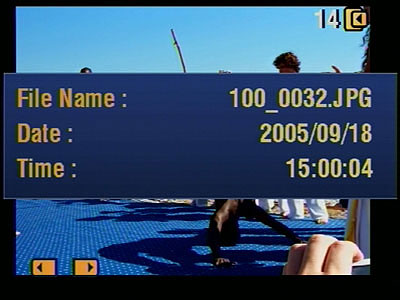
Very basic image information can be displayed. |
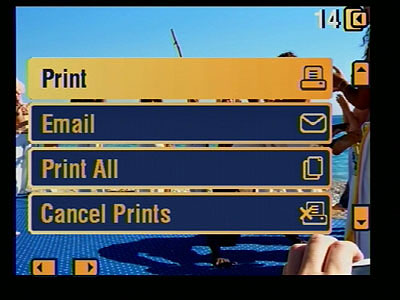
You can tag images for later printing. Both Printer Dock and PictBridge printing are supported.
|
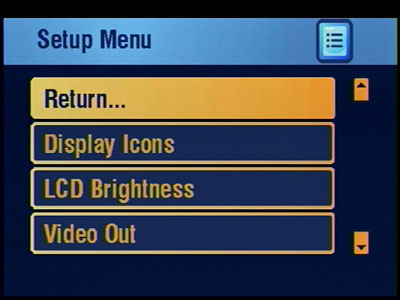
A very simple setup menu is presented to you. |
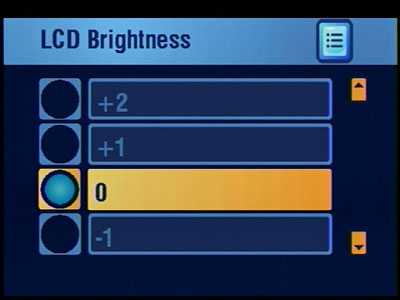
Screen brightness can be adjusted
|
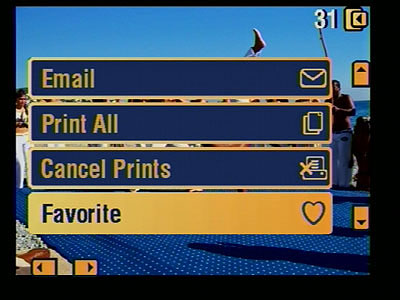
Selected images can be tagged as favourites for easy retrieval. |

There is no movie clip playback mode, instead a selection of still frames from the clip are displayed.
|

A nine image thumbnail display speeds up image selection. |

Here is the full frame image display…
|

..but the only zoom facility is one step to 2x. |
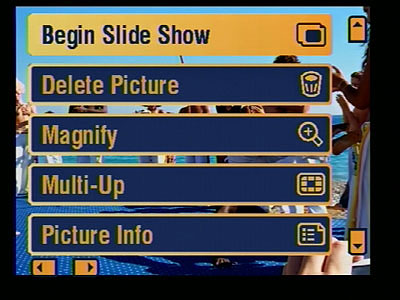
You can manually navigate forwards or backwards through the stored images or start a slide show.
|
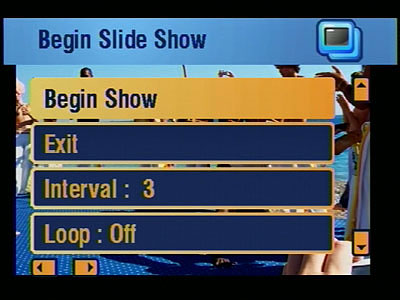
A slide show interval time in seconds can be set and the show can be looped continuously. |
|
Finally, on the last page of this article you will find the EasyShare Picture Viewer's product specifications.
Specifications
|
Easier display viewing
|
| LCD | 2.5 in. (6.4 cm)
|
| LCD resolution | 201K
|
| Magnify option | 2X
|
| Cycle time between photos | Less than 0.5 seconds
|
| Time to display | Full-resolution image display less than 3 seconds
|
| Slide show options | Selectable interval times, selectable slideshow transitions
|
| Brightness | Available
|
| Share button | On-viewer picture tagging for printing, e-mailing, and organizing
|
| Specifications
|
| Picture input | KODAK EASYSHARE Software, Favorites or SD/MMC card
|
| Compatibility | KODAK EASYSHARE Printer Dock Series 3, KODAK EASYSHARE Camera Dock Series 3, IMAGELINK Print System compatible*
|
| Connection | Simple transfer of pictures using USB for WINDOWS 2000 OS and XP OS and MACINTOSH OS X 10.2.8, 10.3 based machines
|
| Storage | 32 MB (over 150 pictures)
|
| TV viewing | Available with optional KODAK EASYSHARE Printer Dock Series 3 or KODAK EASYSHARE Camera Dock Series 3
|
| Power | Internal Lithium-Ion battery rechargeable via USB cable through PC or optional EASYSHARE Docks
|
| Recharge time | Less than 4 hours
|
| Viewing time | Approximately 3 hours on full battery charge
|
| Certification | CE (EMC), FCC Class B (EMI), Canadian ICES-003 Class B (EMI), C-tick (EMI)
|
| Dimensions | 3.4 × 2.3 × 0.5 in. (87 × 58 × 12 mm)
|
| Weight | 2.4 oz (68 g)
|
| Warranty
|
| Warranty | One-year limited
|
Package Contents
KODAK EASYSHARE Picture Viewer
KODAK EASYSHARE Software CD
Protective case
USB cable
Insert for optional KODAK EASYSHARE Docks
Getting Started Kit


