Announcement

Collapse
No announcement yet.

Lightroom 3 large catalogue library filter instability

Collapse
X
 
  • Filter
  • Time
  • Show
Clear All
new posts

  • SOLVED Lightroom 3 large catalogue library filter instability

    I've come across a frustrating issue with Lightroom 3 that seems to be documented elsewhere, but I have yet to find a fix.

    Basically, my main catalogue has around 55,000 images, which is large by most standards. I can manually navigate around the catalogue normally, and use the Develop module to edit my images, but the moment I try to search the catalogue using the Library module filter, Lightroom 3 crashes.
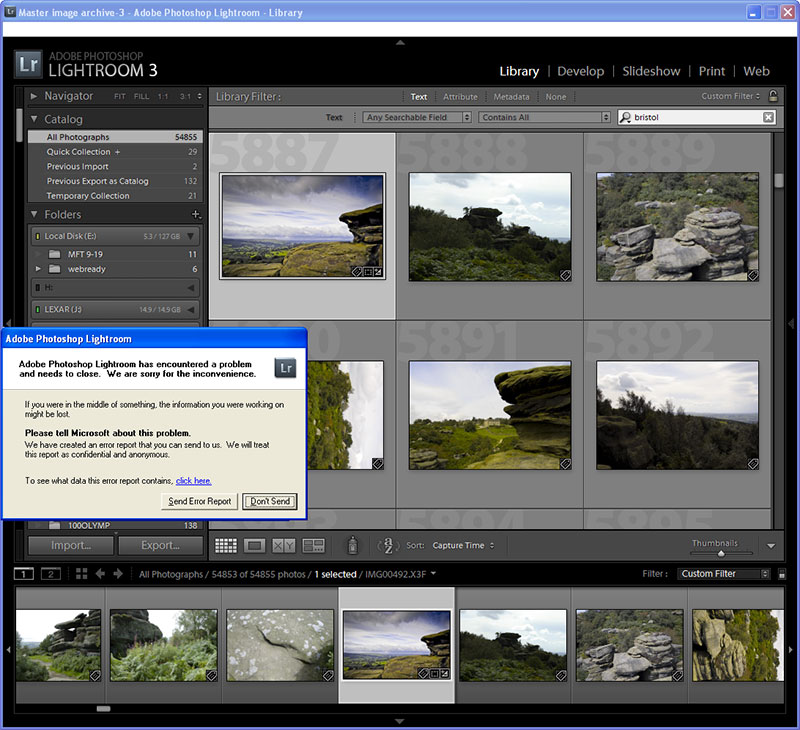


    The same catalogue in Lightroom 2.7, which I'm continuing to use (on the same computer) works normally. I should clarify that the 'same' catalogue in LR3 is a copy, imported from Lightroom 2.7.

    On my laptop, I haven't experienced any issues, although the main catalogue I use there is much smaller with only a couple of thousand images.

    Ideas anyone?!

    Ian
    Last edited by Ian; 28-07-10, 12:08 PM.
    Founder/editor
    Digital Photography Now (DPNow.com)
    Twitter: www.twitter.com/ian_burley
    Flickr: www.flickr.com/photos/dpnow/
    Pinterest: www.pinterest.com/ianburley/

  • #2
    Re: Lightroom 3 large catalogue library filter instability

    Hi Ian,

    It sounds as though there is either something about the catalogue created by LR2 that LR3 doesn't like, or something happened when LR3 referenced it on installation. I presume that you have tried optimising the catalogue!
    I would suggest doing a search by individual folders rather than by 'All Images' to see if you can locate a problem folder causing the crash. It may even be just one image!
    How much work would be involved in creating a new catalogue in LR3?

    Comment


    • #3
      Re: Lightroom 3 large catalogue library filter instability

      Maybe it would be worth starting a new Catalogue, import a few folders of photos and see if the problem re-occurs. If not keep importing folders
      Stephen

      sigpic

      Check out my BLOG too


      Comment


      • #4
        Re: Lightroom 3 large catalogue library filter instability

        I have been removing empty or disconnected folders, but it makes no difference. Optimising doesn't help either.

        I have spent months key wording the catalogue too...

        Ian
        Founder/editor
        Digital Photography Now (DPNow.com)
        Twitter: www.twitter.com/ian_burley
        Flickr: www.flickr.com/photos/dpnow/
        Pinterest: www.pinterest.com/ianburley/

        Comment


        • #5
          Re: Lightroom 3 large catalogue library filter instability

          Originally posted by Ian View Post
          I have been removing empty or disconnected folders, but it makes no difference. Optimising doesn't help either.

          I have spent months key wording the catalogue too...

          Ian
          Ian I've just checked a folder of photos in Bridge and the Keywords still appear to be with the photo. I'm thinking then that if you reimport your folders into a new catalogue, Lightroom will simply read the XMP data and return your keywords with the photos. Maybe worth a try
          Stephen

          sigpic

          Check out my BLOG too


          Comment


          • #6
            Re: Lightroom 3 large catalogue library filter instability

            I'll have a go importing chunks of folders at a time then

            Ian
            Founder/editor
            Digital Photography Now (DPNow.com)
            Twitter: www.twitter.com/ian_burley
            Flickr: www.flickr.com/photos/dpnow/
            Pinterest: www.pinterest.com/ianburley/

            Comment


            • #7
              Re: Lightroom 3 large catalogue library filter instability

              What I'd like to know is, what the link is between your LR gallery screengrab and rogleale's DPNow gallery
              Stephen

              sigpic

              Check out my BLOG too


              Comment


              • #8
                Re: Lightroom 3 large catalogue library filter instability

                I have now marked this one as 'solved' although in fact I have only discovered a work around, so Adobe still needs to fix the problem. For more details, see:


                Ian
                Founder/editor
                Digital Photography Now (DPNow.com)
                Twitter: www.twitter.com/ian_burley
                Flickr: www.flickr.com/photos/dpnow/
                Pinterest: www.pinterest.com/ianburley/

                Comment


                • #9
                  Re: Lightroom 3 large catalogue library filter instability

                  Originally posted by Stephen View Post
                  Ian I've just checked a folder of photos in Bridge and the Keywords still appear to be with the photo. I'm thinking then that if you reimport your folders into a new catalogue, Lightroom will simply read the XMP data and return your keywords with the photos. Maybe worth a try
                  Back to this headache I'm having. Your suggestion doesn't work for me. Key words in my original, flakey, catalogue, are not embedded in the images; they are in the catalogue database. So when I create a new catalogue and import folders of images (using ADD because I don't want to duplicate the originals), there are no key words unless they already existed in files themselves.

                  It does seem that the new catalogue idea works, as it doesn't seem to crash, but I need a way of retaining the keywords otherwise I lose months of work tagging everything

                  Ian
                  Founder/editor
                  Digital Photography Now (DPNow.com)
                  Twitter: www.twitter.com/ian_burley
                  Flickr: www.flickr.com/photos/dpnow/
                  Pinterest: www.pinterest.com/ianburley/

                  Comment


                  • #10
                    Re: Lightroom 3 large catalogue library filter instability

                    Originally posted by Ian View Post
                    Back to this headache I'm having. Your suggestion doesn't work for me. Key words in my original, flakey, catalogue, are not embedded in the images; they are in the catalogue database. So when I create a new catalogue and import folders of images (using ADD because I don't want to duplicate the originals), there are no key words unless they already existed in files themselves.

                    It does seem that the new catalogue idea works, as it doesn't seem to crash, but I need a way of retaining the keywords otherwise I lose months of work tagging everything

                    Ian
                    I ought to clarify that I don't have the write metadata to XMP option enabled. Maybe I should!

                    Ian
                    Founder/editor
                    Digital Photography Now (DPNow.com)
                    Twitter: www.twitter.com/ian_burley
                    Flickr: www.flickr.com/photos/dpnow/
                    Pinterest: www.pinterest.com/ianburley/

                    Comment


                    • #11
                      Re: Lightroom 3 large catalogue library filter instability

                      OK, I can select all 60,000+ images in Library, then use the Save Metadata to File option. Do you think I should

                      Ian
                      Founder/editor
                      Digital Photography Now (DPNow.com)
                      Twitter: www.twitter.com/ian_burley
                      Flickr: www.flickr.com/photos/dpnow/
                      Pinterest: www.pinterest.com/ianburley/

                      Comment


                      • #12
                        Re: Lightroom 3 large catalogue library filter instability

                        Originally posted by Ian View Post
                        OK, I can select all 60,000+ images in Library, then use the Save Metadata to File option. Do you think I should

                        Ian
                        YES! Seems like there is nothing to lose
                        Stephen

                        sigpic

                        Check out my BLOG too


                        Comment


                        • #13
                          Re: Lightroom 3 large catalogue library filter instability

                          Well I left the computer to do the job overnight. Will let you know how it went tomorrow...

                          Ian
                          Founder/editor
                          Digital Photography Now (DPNow.com)
                          Twitter: www.twitter.com/ian_burley
                          Flickr: www.flickr.com/photos/dpnow/
                          Pinterest: www.pinterest.com/ianburley/

                          Comment


                          • #14
                            Re: Lightroom 3 large catalogue library filter instability

                            Got into the office this morning only to find that a dialog box had popped up regarding metadata changes made by a third party program, so the process is only half completed. But I reckon it will be finished in an hour's time at most.

                            Then of course I'll need to import all the images into a brand new catalogue. That will definitely be an overnight job, if not more

                            Ian
                            Founder/editor
                            Digital Photography Now (DPNow.com)
                            Twitter: www.twitter.com/ian_burley
                            Flickr: www.flickr.com/photos/dpnow/
                            Pinterest: www.pinterest.com/ianburley/

                            Comment


                            • #15
                              Re: Lightroom 3 large catalogue library filter instability

                              OK, I started the reimport process just over an hour ago and it's 83% done (although that doesn't include building the previews, that will take much longer methinks).

                              Fingers crossed, it will be done by the time I get back to the office tomorrow morning and I will have a properly functioning Lightroom 3 catalogue once again!

                              Ian
                              Founder/editor
                              Digital Photography Now (DPNow.com)
                              Twitter: www.twitter.com/ian_burley
                              Flickr: www.flickr.com/photos/dpnow/
                              Pinterest: www.pinterest.com/ianburley/

                              Comment

                              Working...
                              X